> ## Documentation Index
> Fetch the complete documentation index at: https://docs.chkk.io/llms.txt
> Use this file to discover all available pages before exploring further.
# Cursor
> This is a lightweight guide to walk you through the installation of Cursor, a powerful AI-powered code editor.
Cursor is an AI-powered code editor built on VS Code that integrates ChatGPT-like assistance directly into the development workflow.
It helps developers write, refactor, and understand code faster by combining an IDE with conversational AI.
Agent Responses on this page are illustrative. Exact phrasing from your AI
model may vary depending on the model, settings, and repository context.
* Download Cursor for your OS from the **[downloads
page](https://cursor.com/en/downloads)**
* Run the installer
* Once installed, open Cursor
* Open your project folder in Cursor
Cursor indexes your project folder by default to provide context for assistance. Avoid storing API keys, credentials, or other sensitive material in the folder, at risk of compromise.
Let's start our very first Cursor chat with a simple query that does not make any changes to your files:
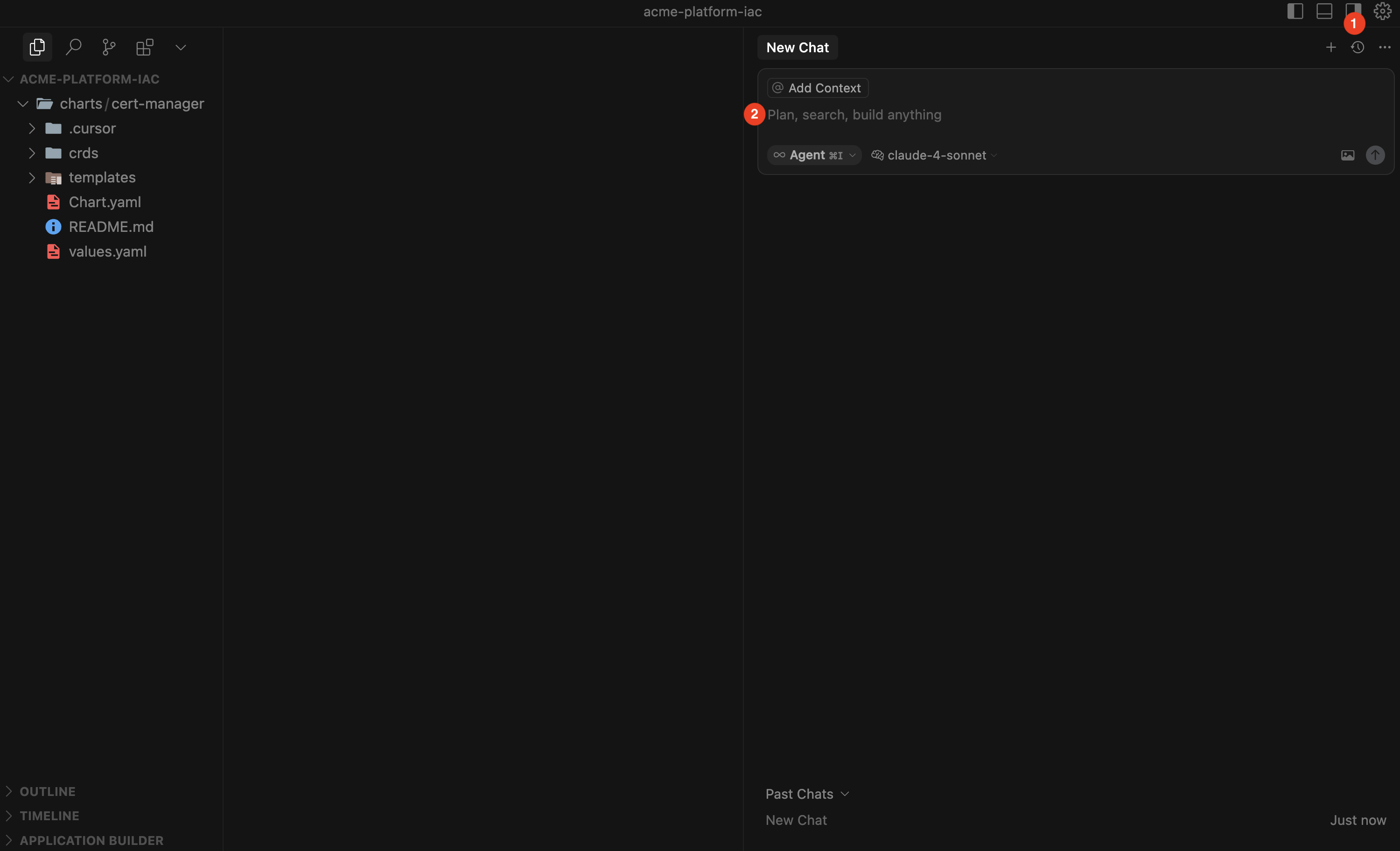 1. Toggle the AI Pane to open a new Chat window
2. In your new chat, run a quick, non-destructive check:
```text theme={"dark"}
Explain this repository and list the top-level folders.
```
**Agent Response:**
1. Toggle the AI Pane to open a new Chat window
2. In your new chat, run a quick, non-destructive check:
```text theme={"dark"}
Explain this repository and list the top-level folders.
```
**Agent Response:**
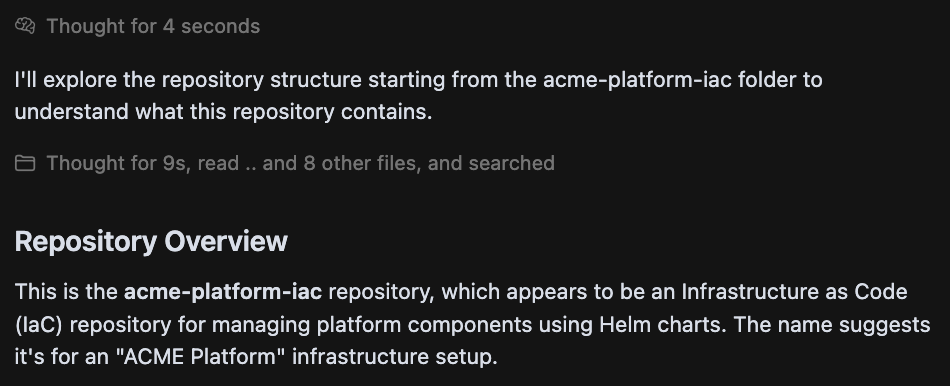 Explore **[Cursor's Chat Overview](https://docs.cursor.com/chat/overview)** to discover the full extent of Cursor's capabilities.
In Cursor, you can switch between modes and models right from the IDE to best fit your use case.
Explore **[Cursor's Chat Overview](https://docs.cursor.com/chat/overview)** to discover the full extent of Cursor's capabilities.
In Cursor, you can switch between modes and models right from the IDE to best fit your use case.
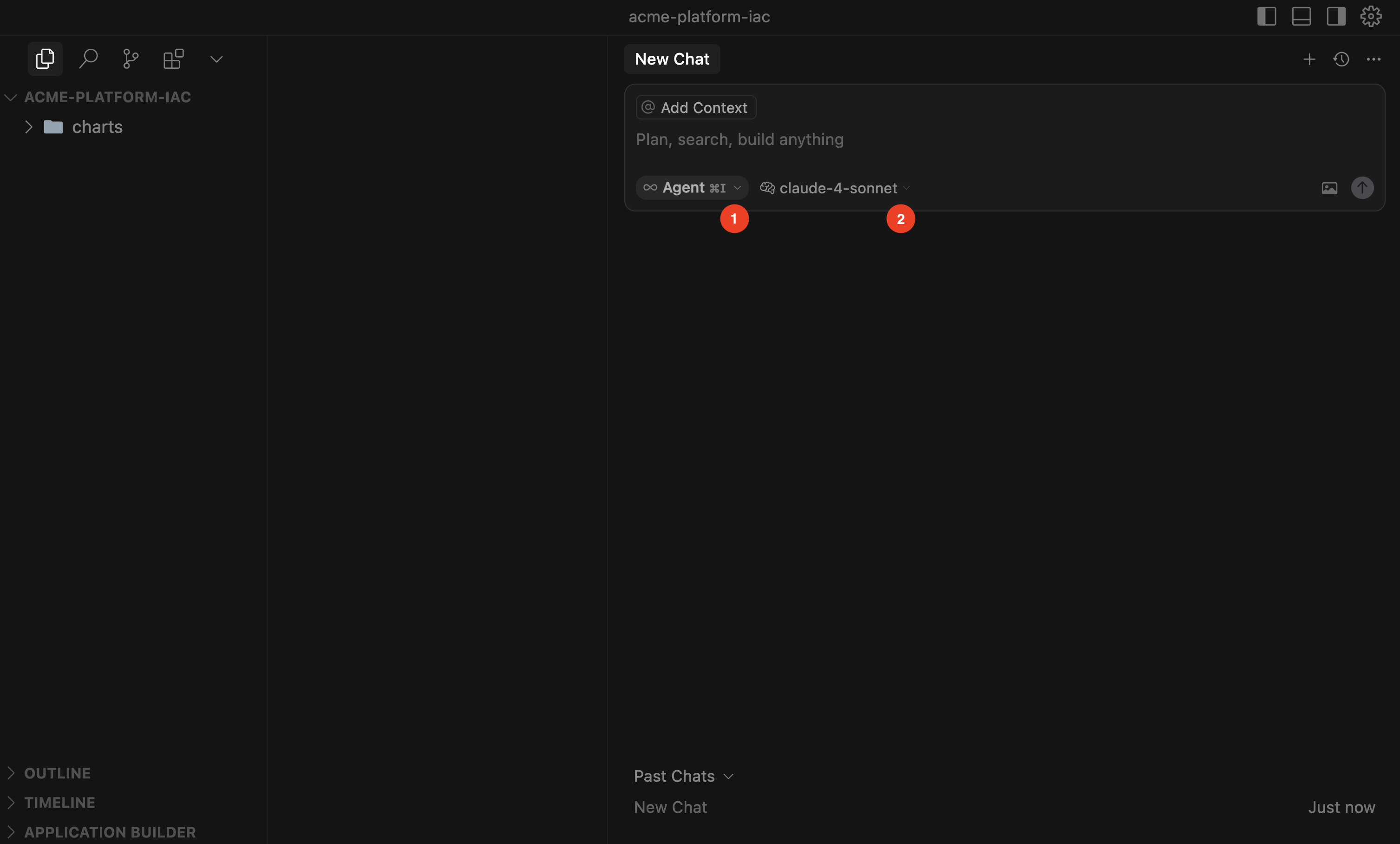 1. **Modes:** Choose how Cursor works for you
* **Agent** (autonomous assistant, can propose or apply multi-file edits)
* **Ask** (read-only mode for exploration and Q\&A, without editing files)
* **Manual** (precise, targeted edits)
* **Custom** (user-defined workflows)
2. **Models:** Configure which AI model powers each mode to optimize for speed, accuracy, or cost depending on your task.
Explore [Cursor's Agent Overview](https://docs.cursor.com/agent) to learn how the agent operates during coding sessions depending on your choice of mode or model
While Cursor is powerful on its own, its capabilities expand further with **Model Context Protocol** (MCP). MCP allows Cursor to connect to external systems, tools, and data sources—bringing richer context into your development workflow.
Chkk’s **Upgrade Agent** integrates via the **Upgrade Context MCP server** to deliver the **Minimal Relevant Context** (MRC) needed to safely upgrade your Infrastructure‑as‑Code (IaC). See the [Upgrade Agent guide](/ai/upgrade-agent).
See how Cursor + Chkk Upgrade Agent can automatically generate ready‑to‑merge PRs to upgrade hundreds of Cloud Native Projects safely and at scale.
1. **Modes:** Choose how Cursor works for you
* **Agent** (autonomous assistant, can propose or apply multi-file edits)
* **Ask** (read-only mode for exploration and Q\&A, without editing files)
* **Manual** (precise, targeted edits)
* **Custom** (user-defined workflows)
2. **Models:** Configure which AI model powers each mode to optimize for speed, accuracy, or cost depending on your task.
Explore [Cursor's Agent Overview](https://docs.cursor.com/agent) to learn how the agent operates during coding sessions depending on your choice of mode or model
While Cursor is powerful on its own, its capabilities expand further with **Model Context Protocol** (MCP). MCP allows Cursor to connect to external systems, tools, and data sources—bringing richer context into your development workflow.
Chkk’s **Upgrade Agent** integrates via the **Upgrade Context MCP server** to deliver the **Minimal Relevant Context** (MRC) needed to safely upgrade your Infrastructure‑as‑Code (IaC). See the [Upgrade Agent guide](/ai/upgrade-agent).
See how Cursor + Chkk Upgrade Agent can automatically generate ready‑to‑merge PRs to upgrade hundreds of Cloud Native Projects safely and at scale.