> ## Documentation Index
> Fetch the complete documentation index at: https://docs.chkk.io/llms.txt
> Use this file to discover all available pages before exploring further.
# Overview
> A developer-first terminal UI to explore the Chkk universe
The `chkk` command-line interface (CLI) offers a developer-first way to explore
the Chkk universe.
## Install
Install a pre-built binary on Linux using the following instructions.
```bash theme={"dark"}
# For AMD64 / x86_64
[ $(uname -m) = x86_64 ] && curl -Lo ./chkk https://cli.chkk.io/download/latest/chkk-linux-amd64
# For ARM64
[ $(uname -m) = aarch64 ] && curl -Lo ./chkk https://cli.chkk.io/download/latest/chkk-linux-arm64
chmod +x ./chkk
sudo mv ./chkk /usr/local/bin/chkk
```
Or using Brew.
```bash theme={"dark"}
brew install chkk-io/cli/chkk
```
Install using Homebrew on MacOS.
```bash theme={"dark"}
brew install chkk-io/cli/chkk
```
Or install a pre-built binary using the following instructions.
```
# For Intel Macs
[ $(uname -m) = x86_64 ] && curl -Lo ./chkk https://cli.chkk.io/download/latest/chkk-darwin-amd64
# For M1 / ARM Macs
[ $(uname -m) = arm64 ] && curl -Lo ./chkk https://cli.chkk.io/download/latest/chkk-darwin-arm64
chmod +x ./chkk
mv ./chkk /some-dir-in-your-PATH/chkk
```
Install a pre-built binary on Windows in PowerShell.
```
curl.exe -Lo chkk-windows-amd64.exe https://cli.chkk.io/download/latest/chkk-windows-amd64
Move-Item .\chkk-windows-amd64.exe c:\some-dir-in-your-PATH\chkk.exe
```
## Quick Start
The `chkk start` command will get you started in the Chkk universe.
The command will lead you through registering one or more clusters
with Chkk and request a Chkk upgrade assessment for those registered
clusters.
Registering a cluster with Chkk is the process of collecting
resources from the cluster and submitting those collected results to
Chkk.
Type `chkk start` in a terminal to begin.
```text theme={"dark"}
> chkk start
__ __ __
.----| |--| |--| |--.
| __| | <| <
|____|__|__|__|__|__|__|
Welcome to Chkk!
This command will help you get started with Chkk.
It will guide you through the process of logging in to your Chkk account and
registering any Kubernetes Clusters if desired.
You may also request an upgrade assessment for any of your registered Kubernetes
Clusters.
────────────────────────────────────────────────────────────────────────────────────────────────────────
Let's get you logged in to your Chkk account.
please confirm the code LCZS-DKDB at https://auth.chkk.io/activate?user_code=LCZS-DKDB
```
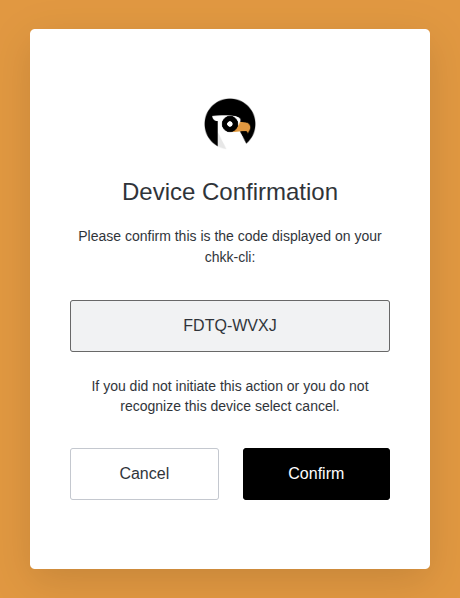
Click on the link and a browser window will appear asking you to confirm a
code.
 ### Register a Cluster
**After clicking "Confirm"**, in your terminal you will see a successful login
message and a prompt to register a cluster with Chkk:
```
successfully logged in as "Jane Doe" (jane.doe@example.com) into organization "demo-org" (org_3c2732f7-9328-477d-910b-54cd94ade5c0).
Do you want to register any Kubernetes Clusters with Chkk? (Y/n)
```
**Hit Enter or "Y"** to start the registration process. We will look in your
kubeconfig for Cloud Native Clusters and ask you to select one or more of those
Kubernetes Clusters to register with Chkk.
```
Found 1 total Kubernetes Clusters in your kubeconfig.
Select the clusters you would like to register. Resources from the selected
clusters will be collected and submitted to Chkk for analysis.
Use the arrow keys to navigate: ↓ ↑ → ←
Select "Submit" to submit choices.
Submit
→ ✔ kind-charlie (https://127.0.0.1:39775)
```
Use the arrow keys to navigate, **hit Enter to select one or more** of the
clusters and navigate up to the Submit line and hit Enter again.
We will ask you to confirm your selection:
```
You made the following 1 selections:
1: kind-charlie (https://127.0.0.1:39775)
Are you sure you want to submit these? Enter 'n' to select again. (Y/n)
```
**Hit Enter or "Y" to collect resources** from the selected clusters and
register them with Chkk.
```
Registering 1 Kubernetes Cluster(s) with Chkk...
registering kind-charlie (https://127.0.0.1:39775)...
✅ cluster "kind-charlie" resource collection successful. 49 resource groups collected.
To view information about your cluster, do:
chkk cluster get k8scl_13673ce4-1cbd-454a-aa31-67b722fadc99
```
**Your newly-registered** cluster will then be displayed along with a
prompt asking if you would like to request a Chkk upgrade assessment for this
cluster:
```
The following 1 Kubernetes Clusters are active in your Chkk account:
┌────────────────────────────────────────────┬──────────────┬────────┬─────────────┬──────────┬──────────────┬──────────┐
│ ID │ NAME │ STATUS │ ENVIRONMENT │ PROVIDER │ KUBE VERSION │ # NODES │
├────────────────────────────────────────────┼──────────────┼────────┼─────────────┼──────────┼──────────────┼──────────┤
│ k8scl_13673ce4-1cbd-454a-aa31-67b722fadc99 │ kind-charlie │ active │ │ KinD │ 1.28 │ 2 │
└────────────────────────────────────────────┴──────────────┴────────┴─────────────┴──────────┴──────────────┴──────────┘
showing 1-1 of 1 records.
Would you like to request an upgrade assessment for any of these Kubernetes Clusters? (Y/n)
```
### Request an Upgrade Assessment
A Chkk upgrade assessment is a report that alerts you to potential issues with
an upgrade of your cluster and recommends upgrade versions for your
Cloud Native Projects.
**Hit Enter or "Y"** to select one or more clusters for an upgrade
assessment.
```
Use the arrow keys to navigate: ↓ ↑ → ←
? Select a cluster to request an upgrade assessment for:
▸ kind-charlie (1.28) (KinD)
```
select a cluster and hit Enter.
```focus={1,6-7} theme={"dark"}
You selected "kind-charlie (1.28) (KinD)". Is this correct? Enter 'n' to select again. (Y/n)
Requesting upgrade assessment for kind-charlie (1.28) (KinD)...
(required) enter the name for the upgrade assessment
charlie
✅ request for upgrade assessement for cluster "k8scl_13673ce4-1cbd-454a-aa31-67b722fadc99" successful.
... waiting for upgrade assessment to complete. this will take a few minutes ...
```
The upgrade assessment will take a few minutes to generate and then you will see:
```focus={5,7} theme={"dark"}
completed!
To view your upgrade assessment, do:
chkk upgradeassessment get ua_a59a7fff-f3c2-4443-9f26-fe97cd187def
Learn more about Chkk upgrade assessments at: https://docs.chkk.io/product/upgrade-copilot/assessments
```
### View an Upgrade Assessment
You can view the upgrade assessment in your terminal using the `chkk
upgradeassessment get` command:
```focus={1,5,7-9} expandable theme={"dark"}
> chkk upgradeassessment get ua_a59a7fff-f3c2-4443-9f26-fe97cd187def
────────────────────────────────────────────────────────────────────────────────────────────────────────
ID: ua_a59a7fff-f3c2-4443-9f26-fe97cd187def
NAME: charlie
CLUSTER: k8scl_13673ce4-1cbd-454a-aa31-67b722fadc99
STATUS: ready
DESIRED VERSION: 1.29
UPGRADE STRATEGY: in-place
────────────────────────────────────────────────────────────────────────────────────────────────────────
REQUESTED BY
────────────────────────────────────────────────────────────────────────────────────────────────────────
USER ID: usr_c7081c76-7e9a-4e38-bbbd-0c7ba9722fa7
EMAIL: jane.doe@example.com
NAMES: Jane Doe
────────────────────────────────────────────────────────────────────────────────────────────────────────
REPORT
────────────────────────────────────────────────────────────────────────────────────────────────────────
1 Upgrade Assessment - charlie
────────────────────────────────────────────────────────────────────────────────────────────────────────
ID: ua_a59a7fff-f3c2-4443-9f26-fe97cd187def
Requested: 30 Jul 25 15:03 UTC by Jane Doe
────────────────────────────────────────────────────────────────────────────────────────────────────────
1.1 Metadata
┌──────────────────────────────┬─────────────┐
│ │ │
╞══════════════════════════════╪═════════════╡
│Cluster Name (Chkk) │kind-charlie │
├──────────────────────────────┼─────────────┤
│Current │1.28 │
├──────────────────────────────┼─────────────┤
│Recommended │1.29 │
├──────────────────────────────┼─────────────┤
│Provider │K8s │
├──────────────────────────────┼─────────────┤
│Region │local │
├──────────────────────────────┼─────────────┤
│Node Groups │0 │
├──────────────────────────────┼─────────────┤
│Nodes │2 │
├──────────────────────────────┼─────────────┤
│Blueprint │K8s, In-Place│
├──────────────────────────────┼─────────────┤
│Projects │4 │
└──────────────────────────────┴─────────────┘
────────────────────────────────────────────────────────────────────────────────────────────────────────
1.2 Infrastructure Changes
┌─────────────┬───────┬───────────┐
│K8s │Current│Recommended│
╞═════════════╪═══════╪═══════════╡
│Control Plane│1.28 │1.29 │
└─────────────┴───────┴───────────┘
────────────────────────────────────────────────────────────────────────────────────────────────────────
1.3 Deprecations & Removals
```
### Register a Cluster
**After clicking "Confirm"**, in your terminal you will see a successful login
message and a prompt to register a cluster with Chkk:
```
successfully logged in as "Jane Doe" (jane.doe@example.com) into organization "demo-org" (org_3c2732f7-9328-477d-910b-54cd94ade5c0).
Do you want to register any Kubernetes Clusters with Chkk? (Y/n)
```
**Hit Enter or "Y"** to start the registration process. We will look in your
kubeconfig for Cloud Native Clusters and ask you to select one or more of those
Kubernetes Clusters to register with Chkk.
```
Found 1 total Kubernetes Clusters in your kubeconfig.
Select the clusters you would like to register. Resources from the selected
clusters will be collected and submitted to Chkk for analysis.
Use the arrow keys to navigate: ↓ ↑ → ←
Select "Submit" to submit choices.
Submit
→ ✔ kind-charlie (https://127.0.0.1:39775)
```
Use the arrow keys to navigate, **hit Enter to select one or more** of the
clusters and navigate up to the Submit line and hit Enter again.
We will ask you to confirm your selection:
```
You made the following 1 selections:
1: kind-charlie (https://127.0.0.1:39775)
Are you sure you want to submit these? Enter 'n' to select again. (Y/n)
```
**Hit Enter or "Y" to collect resources** from the selected clusters and
register them with Chkk.
```
Registering 1 Kubernetes Cluster(s) with Chkk...
registering kind-charlie (https://127.0.0.1:39775)...
✅ cluster "kind-charlie" resource collection successful. 49 resource groups collected.
To view information about your cluster, do:
chkk cluster get k8scl_13673ce4-1cbd-454a-aa31-67b722fadc99
```
**Your newly-registered** cluster will then be displayed along with a
prompt asking if you would like to request a Chkk upgrade assessment for this
cluster:
```
The following 1 Kubernetes Clusters are active in your Chkk account:
┌────────────────────────────────────────────┬──────────────┬────────┬─────────────┬──────────┬──────────────┬──────────┐
│ ID │ NAME │ STATUS │ ENVIRONMENT │ PROVIDER │ KUBE VERSION │ # NODES │
├────────────────────────────────────────────┼──────────────┼────────┼─────────────┼──────────┼──────────────┼──────────┤
│ k8scl_13673ce4-1cbd-454a-aa31-67b722fadc99 │ kind-charlie │ active │ │ KinD │ 1.28 │ 2 │
└────────────────────────────────────────────┴──────────────┴────────┴─────────────┴──────────┴──────────────┴──────────┘
showing 1-1 of 1 records.
Would you like to request an upgrade assessment for any of these Kubernetes Clusters? (Y/n)
```
### Request an Upgrade Assessment
A Chkk upgrade assessment is a report that alerts you to potential issues with
an upgrade of your cluster and recommends upgrade versions for your
Cloud Native Projects.
**Hit Enter or "Y"** to select one or more clusters for an upgrade
assessment.
```
Use the arrow keys to navigate: ↓ ↑ → ←
? Select a cluster to request an upgrade assessment for:
▸ kind-charlie (1.28) (KinD)
```
select a cluster and hit Enter.
```focus={1,6-7} theme={"dark"}
You selected "kind-charlie (1.28) (KinD)". Is this correct? Enter 'n' to select again. (Y/n)
Requesting upgrade assessment for kind-charlie (1.28) (KinD)...
(required) enter the name for the upgrade assessment
charlie
✅ request for upgrade assessement for cluster "k8scl_13673ce4-1cbd-454a-aa31-67b722fadc99" successful.
... waiting for upgrade assessment to complete. this will take a few minutes ...
```
The upgrade assessment will take a few minutes to generate and then you will see:
```focus={5,7} theme={"dark"}
completed!
To view your upgrade assessment, do:
chkk upgradeassessment get ua_a59a7fff-f3c2-4443-9f26-fe97cd187def
Learn more about Chkk upgrade assessments at: https://docs.chkk.io/product/upgrade-copilot/assessments
```
### View an Upgrade Assessment
You can view the upgrade assessment in your terminal using the `chkk
upgradeassessment get` command:
```focus={1,5,7-9} expandable theme={"dark"}
> chkk upgradeassessment get ua_a59a7fff-f3c2-4443-9f26-fe97cd187def
────────────────────────────────────────────────────────────────────────────────────────────────────────
ID: ua_a59a7fff-f3c2-4443-9f26-fe97cd187def
NAME: charlie
CLUSTER: k8scl_13673ce4-1cbd-454a-aa31-67b722fadc99
STATUS: ready
DESIRED VERSION: 1.29
UPGRADE STRATEGY: in-place
────────────────────────────────────────────────────────────────────────────────────────────────────────
REQUESTED BY
────────────────────────────────────────────────────────────────────────────────────────────────────────
USER ID: usr_c7081c76-7e9a-4e38-bbbd-0c7ba9722fa7
EMAIL: jane.doe@example.com
NAMES: Jane Doe
────────────────────────────────────────────────────────────────────────────────────────────────────────
REPORT
────────────────────────────────────────────────────────────────────────────────────────────────────────
1 Upgrade Assessment - charlie
────────────────────────────────────────────────────────────────────────────────────────────────────────
ID: ua_a59a7fff-f3c2-4443-9f26-fe97cd187def
Requested: 30 Jul 25 15:03 UTC by Jane Doe
────────────────────────────────────────────────────────────────────────────────────────────────────────
1.1 Metadata
┌──────────────────────────────┬─────────────┐
│ │ │
╞══════════════════════════════╪═════════════╡
│Cluster Name (Chkk) │kind-charlie │
├──────────────────────────────┼─────────────┤
│Current │1.28 │
├──────────────────────────────┼─────────────┤
│Recommended │1.29 │
├──────────────────────────────┼─────────────┤
│Provider │K8s │
├──────────────────────────────┼─────────────┤
│Region │local │
├──────────────────────────────┼─────────────┤
│Node Groups │0 │
├──────────────────────────────┼─────────────┤
│Nodes │2 │
├──────────────────────────────┼─────────────┤
│Blueprint │K8s, In-Place│
├──────────────────────────────┼─────────────┤
│Projects │4 │
└──────────────────────────────┴─────────────┘
────────────────────────────────────────────────────────────────────────────────────────────────────────
1.2 Infrastructure Changes
┌─────────────┬───────┬───────────┐
│K8s │Current│Recommended│
╞═════════════╪═══════╪═══════════╡
│Control Plane│1.28 │1.29 │
└─────────────┴───────┴───────────┘
────────────────────────────────────────────────────────────────────────────────────────────────────────
1.3 Deprecations & Removals
```